
Beetroot v1.6.0 — Rust Search Engine, No-Focus Window
Beetroot's search engine moved to Rust — accent folding, typo tolerance, prefix matching. Plus a no-focus window that doesn't interrupt your workflow.
The single most annoying thing about Beetroot was that opening it stole focus. You're renaming a file in Explorer, hit F2, start typing — then open Beetroot to grab something from history, and Explorer loses focus. Your rename is gone. Same with IDE refactoring dialogs, search boxes, anything that relies on focus.
v1.6.0 fixes this. And while I was in there, I rewrote the search engine in Rust.
At a glance:
- No-focus window — Beetroot no longer steals focus from other apps
- Rust search engine — accent folding, typo tolerance, prefix matching. Fuse.js removed
- Window position — choose where Beetroot appears: Center, Top Left, Top Right, Bottom Left, Bottom Right
- 4 new text transforms — Remove spaces, Single line, Sort lines, Remove duplicates
- Transform menu search — filter through your transforms when the list gets long
- 10 bug fixes — including Snipping Tool capture, regex crashes, and AI
<think>tags
A clipboard manager that doesn't interrupt you
Before v1.6.0, opening Beetroot was like Alt-Tabbing — it took focus from whatever you were doing. F2 rename in Explorer? Gone. IDE refactoring dialog? Lost focus. Any "type here" prompt — interrupted.
This sounds like it should be a one-line fix. It wasn't.
Tauri v2's win.show() calls ShowWindow(SW_SHOW) under the hood, which activates the window. That's fine for a normal app. But Beetroot's frontend runs inside WebView2 (Chromium), and WebView2 has its own ideas about focus. Every standard Win32 approach failed:
| Approach | Why it didn't work |
|---|---|
WS_EX_NOACTIVATE | WebView2 child process ignores the flag |
SW_SHOWNOACTIVATE | WebView2 grabs focus anyway |
| Focus bounce (SetForegroundWindow back) | WM_KILLFOCUS already fired — too late |
Subclass WM_ACTIVATE on parent | WebView2 children bypass parent messages |
The fix: LockSetForegroundWindow(LSFW_LOCK) — an OS-level lock that prevents any process (including WebView2's Chromium subprocess) from changing the foreground window. Lock before show, unlock after. A 30-second safety timer auto-unlocks if something goes wrong.
Since Beetroot doesn't have focus, keyboard input doesn't reach it normally. Navigation works through a low-level keyboard hook (WH_KEYBOARD_LL) that intercepts arrow keys, Enter, Escape, Space, and Alt-combinations when the no-focus mode is active. Clicks outside the window hide it — same behavior as Win+V.
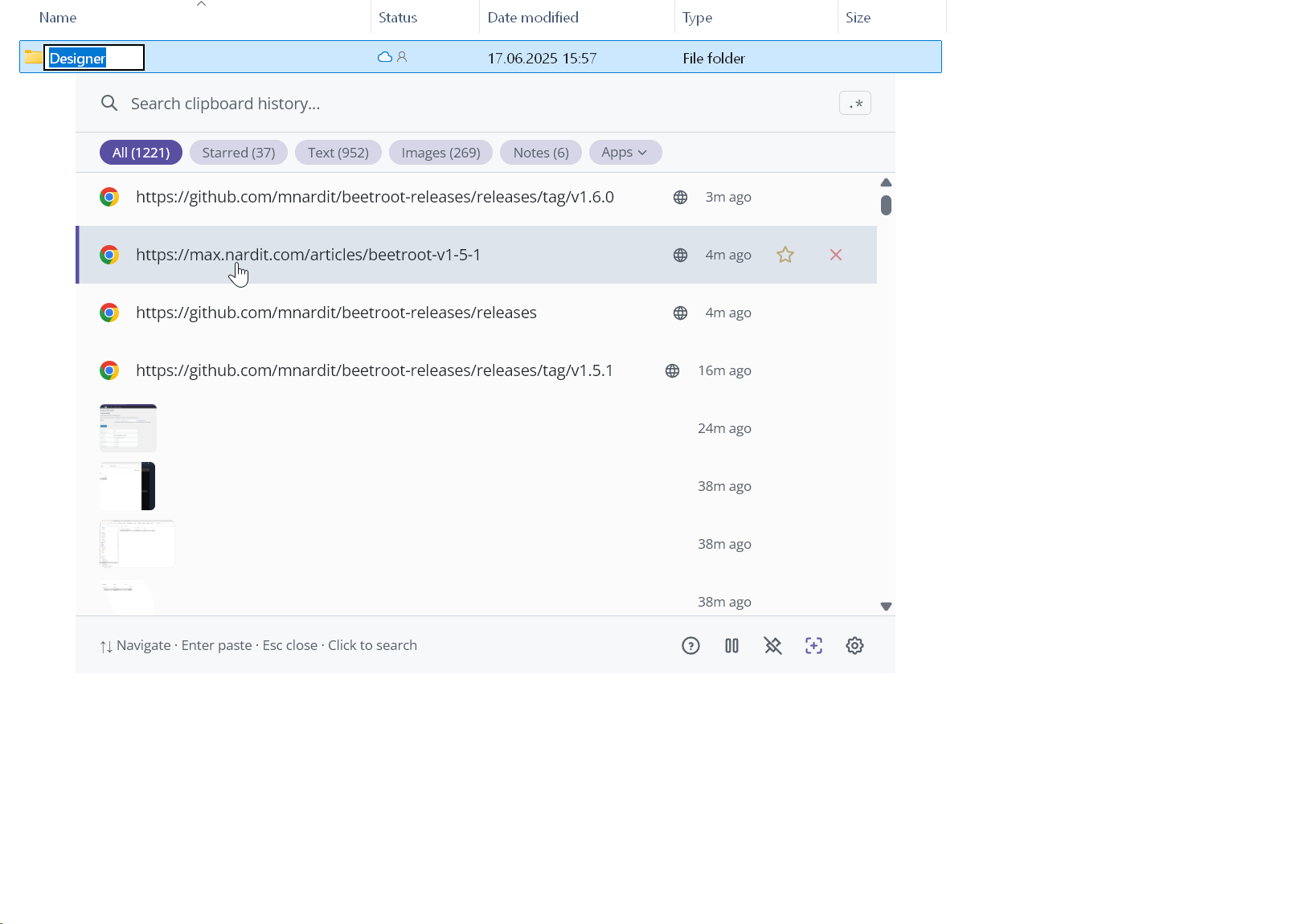
One bonus: Beetroot briefly appears above always-on-top windows like Task Manager when summoned by hotkey. Otherwise you'd never see it when a fullscreen or always-on-top app is active.
Search, rewritten in Rust
The v1.5.1 search was a TypeScript scoring system — 5 phases, Map-based dedup, Fuse.js for fuzzy. It worked well for day-to-day use. But the search ran in the UI thread, and every keystroke pushed all items through IPC into React state. At 500 items that's fine. At 10K it's not.
v1.6.0 moves the entire search to a Rust backend (~700 lines in search.rs). Not Tantivy, not Nucleo — a custom implementation that mirrors the 5-phase architecture from v1.5.1 but runs natively:
| Phase | What it does | Score |
|---|---|---|
| 1 | Contiguous substring in content/note | 1.0 |
| 2 | Word-start tokens (camelCase, underscore, hyphen) | 0.75 |
| 3 | Contiguous substring in source app/title | 0.5 |
| 4 | Word-start tokens in source app/title | 0.25 |
| 5 | Levenshtein distance ≤ 1 + prefix match ≥ 60% | 0.05–0.15 |
Phase 5 replaces Fuse.js entirely. Fuse.js used a modified Bitap algorithm that worked great on short strings but produced garbage on long clipboard content. The new fuzzy phase uses edit distance per word — each word in the query is compared against each word in the content. "timout" matches "timeout" (distance 1). "mecrosoft" doesn't match "Microsoft" (distance 2). Clean, predictable.
Accent folding — "cafe" finds "café", "resume" finds "résumé". The engine uses Unicode NFD decomposition to strip combining marks before matching. Both the query and content are normalized the same way, so diacritics become invisible to search.
The real win isn't speed — it's architecture. The JS search loaded all items into React state on every keystroke via IPC (500 objects per call). The Rust search returns only filtered results + match indices + filter counts in a single IPC call. Less data across the bridge, less React rendering, smoother typing.
| Items | JS (v1.5.1) | Rust (v1.6.0) |
|---|---|---|
| 500 | ~2ms | ~2ms |
| 10K | — | ~7ms |
| 100K | — | ~50ms (estimated) |
At 500 items the raw search time is the same. The difference is in everything around it — IPC payload, React state updates, render cycles.
Window position
Beetroot used to always appear at center of your current monitor. Now you can pick: Center, Top Left, Top Right, Bottom Left, or Bottom Right.
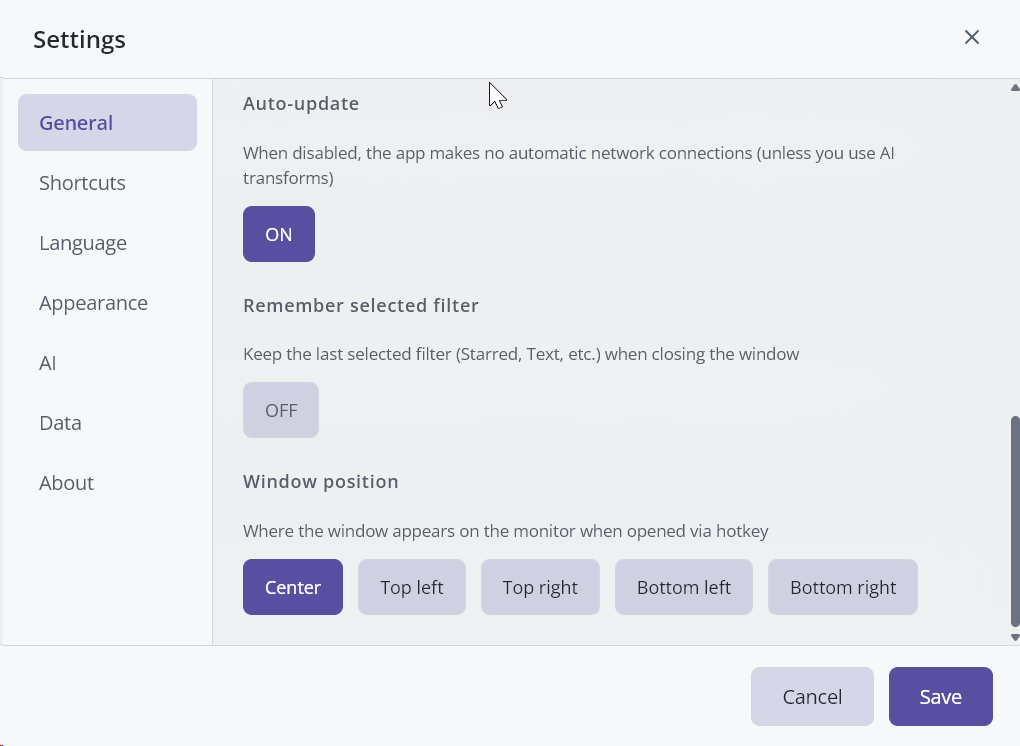
The same settings panel now has Remember selected filter — your last active filter (Starred, Text, Images, etc.) persists between opens instead of resetting to All every time.
Transform menu search
If you've added custom AI prompts on top of the built-in transforms, the menu gets long. Now there's a search box at the top — type "upper" to jump to UPPERCASE, "sort" to find Sort lines.
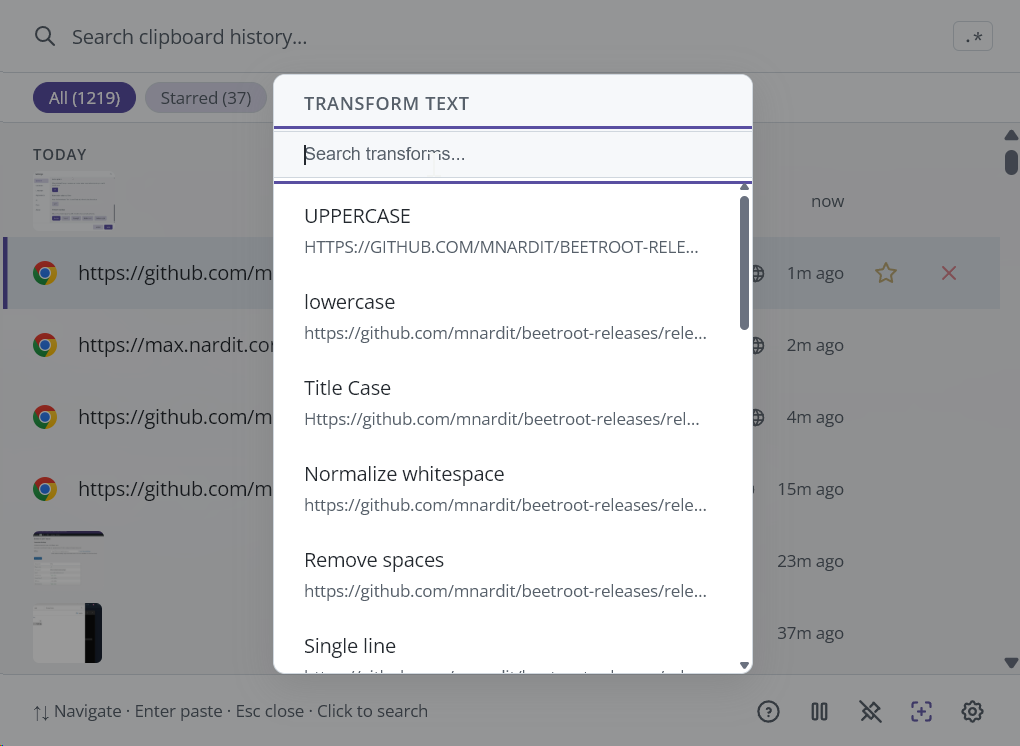
4 new text transforms:
| Transform | What it does |
|---|---|
| Remove spaces | Strips all whitespace |
| Single line | Joins multiline text into one line |
| Sort lines | Alphabetical sort |
| Remove duplicates | Deduplicates lines |
No AI needed — they run instantly, locally.
Other improvements
- Image source tracking — images now capture which app and window they came from, just like text clips
- Localized timestamps — "3m ago", "2d ago" labels use the app language instead of always English
- Unicode Title Case — works correctly with Cyrillic, CJK, Arabic, and other scripts
- Better AI errors — rate limits and content filter blocks show specific messages instead of generic failures
- Space toggles preview — press Space to open, Space again to close (previously needed Escape)
- Pinned mode paste feedback — shows "Copied to clipboard" toast
Bug fixes
Snipping Tool screenshots not captured — two bugs stacked on top of each other. First: Windows' CanIncludeInClipboardHistory format (used by Snipping Tool, Office, Notepad) was being false-positive detected as a password manager signal, so screenshots were dropped. Second: the clipboard plugin checked for file formats before image formats — Snipping Tool sets both, and the file check returned early before reaching the image check.
Regex crashes — patterns like ^, a*, b? that match empty strings caused infinite loops. Now handled gracefully.
AI <think> tags — Anthropic Claude and DeepSeek models sometimes wrap responses in <think>...</think> reasoning tags. These are now stripped from the output.
Starred items sorting — starred clips were incorrectly floating to the top of the All tab. Now strictly chronological. Use the Starred filter to see only starred clips.
Plus: rich text paste duplicates, local AI endpoint blocking the UI for up to 5 seconds, clipboard monitor race on rapid sleep/wake, overlays persisting after hide/show, transform results applying after menu closed, search highlight at wrong position on multiline clips.
How to update
Beetroot will offer to update automatically. Or download v1.6.0 from GitHub.
